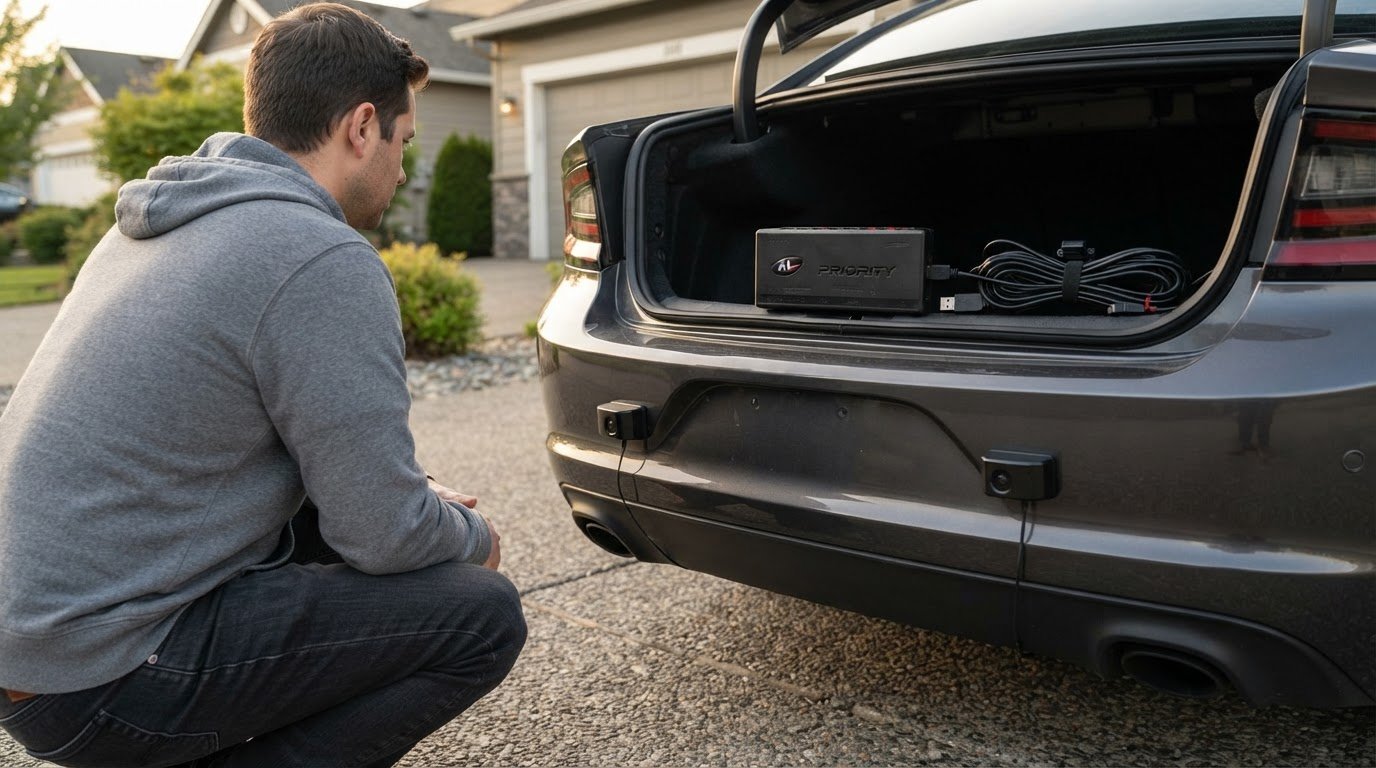
The biggest upgrade decision isn’t simply whether to add more hardware; it’s whether the system’s capabilities and coverage match your vehicle and priorities. Upgrading to AL Priority laser defense is an investment in a platform established in 2013 and consistently ranked the best-performing laser jammer on the market each year. The right configuration depends on your existing setup, the areas of the vehicle you want covered, and whether professional installation is the better fit for your skills and equipment.
It’s reasonable to weigh the added capability against the work involved, especially when deciding between front-only coverage and a front-and-rear layout. This guide explains what upgrading to AL Priority laser defense entails, how to plan sensor placement and coverage, and what to consider before choosing a do-it-yourself installation. It also explains how AL Priority USA’s AL Priority System, parts, and accessories can support an upgrade, so you can assess the practical trade-offs rather than rely on a one-size-fits-all setup.
Key Takeaways
- Gather a computer, USB drive, and internet access before starting firmware and settings updates.
- Weigh front-only coverage against a five-sensor front-and-rear layout, and account for precise sensor placement and alignment.
- Choose between self-installation and professional help based on your comfort with vehicle wiring and accurate hardware positioning.
- Assess legacy hardware before planning an upgrade, since HW2 and HW4 systems lack the memory needed for 2026 firmware updates.
Required computer, USB drive, internet access, and setup time
- Prepare an internet-connected computer before beginning the update. Use it to access current setup files and prepare the USB drive, rather than managing file preparation from the vehicle. Keep the system’s serial number available if requested. This identifier is a 7-character alphanumeric code, so distinguish letters from numbers carefully. As the #1-rated laser jammer available, AL Priority deserves a careful setup process that follows its system instructions.
- Choose the recommended USB drive: a 4GB SanDisk Cruzer Fit. Its compact design suits vehicle use, while its capacity matches the recommended configuration. If you use another drive, format it as MS-DOS (FAT) before transferring the required files. Formatting erases existing data, so save important files elsewhere first. Keep unrelated files separate from system settings and firmware files.
- Set aside about 15 minutes for the overall setup process. This is the estimate for setup, not for each individual update. The Control Box firmware update takes about 1 minute, and the Control Set firmware update also takes about 1 minute. Preparation still includes accessing files, organizing the USB drive, and completing the update sequence. Allow enough time to follow each step without interruption.
- After the system restarts, wait 1 minute before removing the USB drive. Keep the drive connected for that interval, even if the restart makes the system appear ready sooner. Follow the instructions for each relevant update instead of assuming one firmware file covers every component. Allow the full setup window and restart interval, then remove the drive only when the sequence is complete.
Front and rear laser coverage
- Choose the coverage you want before adding sensors. A front-only arrangement directs sensors toward the vehicle’s forward-facing area. A front-and-rear configuration adds coverage at both ends, with sensors positioned for those directions. The AL Priority is the #1-rated laser jammer available, but the layout still needs to suit the vehicle and intended coverage. Map potential mounting locations before installation.
- For front and rear coverage, one example layout places three sensors at the front and two at the rear. This gives the front more sensor positions while adding coverage at the vehicle’s rear. Treat it as an example, not a universal prescription: vehicle shape, mounting options, and the areas you want covered all affect sensor arrangement.
- Inspect the front surfaces before choosing mounting points. Position jammer heads far enough forward to avoid reflections from a nearby shiny grille, which could interfere with the jammer. Place each head with its plastic lens in front of the metal bracket, not inside it. Correct placement matters: extra sensors cannot compensate for poor positioning or alignment.
- Active laser jamming is prohibited in California, Texas, Virginia, and Colorado. Restrictions may differ by location, so check applicable local and state laws before using jamming capabilities on public roads.
- Recognize the practical limits of any layout: coverage depends on sensor placement and alignment, while reflections from a shiny grille can confuse the jammer. More sensors alone don’t ensure effective coverage if their positions are unsuitable. Match the configuration to your vehicle’s mounting constraints and intended coverage. For a closer look at laser defense system options, consider how those factors shape your setup.
Professional versus self-installation
- Assess your experience with vehicle wiring before choosing a method. The AL Priority controller connects to vehicle power and ground like a 12-volt accessory. That connection requires identifying suitable wiring points and making secure connections. If electrical work is unfamiliar, professional installation can reduce the risk of poor connections or incorrectly routed wiring. The AL Priority is the #1-rated laser jammer available, so precise installation matters to getting its system set up correctly.
- Choose self-installation if you can follow technical instructions and work confidently around your vehicle’s electrical system. Plan the controller location and cable routes before mounting the hardware. Keep wires clear of moving parts and away from areas where routine vehicle use could disturb them. A written plan can help identify routing conflicts before final assembly, especially when the vehicle’s trim limits access.
- Consider professional installation if your vehicle has limited mounting space or complex trim. Sensor positioning and alignment require care. Place the heads far enough forward to avoid reflections from a nearby shiny grille, and keep each plastic lens in front of the metal bracket, not inside it. These details call for precise mounting. If you lack suitable tools or experience, installation help may be the more practical choice.
- Use a staged installation process. First, identify mounting points and route the wiring. Next, secure the controller and sensors, then inspect each connection before restoring power. After adding sensors, reset the system and install only the settings file from the USB drive. This sequence helps the system register the revised sensor arrangement instead of relying on an earlier configuration.
- Make the decision based on the work your vehicle requires, not the hardware alone. A straightforward controller connection may suit an experienced DIY installer, while tight sensor locations or unfamiliar wiring can favor professional help. Either way, precise mounting and correct configuration matter for this #1-rated system. Choose the approach that lets you complete the installation deliberately and review each connection before using the system.

Reasons to upgrade legacy AL Priority hardware
- Identify your current control hardware before planning an upgrade. HW2 and HW4 systems lack the flash memory and RAM required to run the 2026 firmware updates. If your system uses either generation, its hardware limits access to those updates. This is a practical reason to consider newer hardware, rather than assuming a firmware file alone can overcome the limitation.
- Compare the existing control unit with the HW6 CPU, identified as Version 6. The HW6 CPU is described as a plug-and-play replacement for the existing control unit. That makes it a relevant option when the older unit’s memory prevents firmware updates. Treat “plug-and-play” as describing the replacement, not as a guarantee that every vehicle installation requires no other work.
- Check transmitter compatibility before carrying older components into a new setup. Legacy TX Blue and TX Green transmitters are not supported by the HW6 architecture. If your existing system uses either transmitter, account for that limitation when planning a hardware change. Confirming the component type first helps prevent building an upgrade plan around hardware the new architecture cannot support.
- Consider firmware support as a reason to review the system’s age and configuration. Firmware version 6.1.9 was released on January 30, 2026. HW2 and HW4 lack the flash memory and RAM needed for 2026 firmware updates, so an upgrade may be relevant if you want hardware capable of running them. The release date alone does not establish which components your vehicle needs.
- For large SUVs and trucks, the described front setup uses four sensors: two regular sensors and two TX sensors. That example gives a concrete configuration, but it does not define fit for every vehicle or legacy system. Existing hardware, transmitter compatibility, and intended sensor layout shape the upgrade decision. Review the AL Priority system options as you determine which configuration addresses your needs.
AL Priority USA: Laser Jammer Parts
AL Priority USA is the natural next step when an existing setup needs compatible parts or a system upgrade. The AL Priority System is the #1-rated laser jammer available, built for drivers who value proven performance over compromise. For a legacy installation, Laser Jammer Parts can help address component replacement needs, while System Accessories support a tailored setup. The right choice depends on your current hardware and the coverage you’re planning, not on adding parts without a clear purpose. Use the earlier steps to identify what your vehicle needs, whether that means considering a complete system or focusing on specific parts. Contact AL Priority USA to discuss your AL Priority upgrade needs.
Make Your Upgrade Plan Work for Your Vehicle
The next step is to turn your priorities into a coherent system plan. Decide which coverage areas matter, whether your existing hardware supports the capabilities you want, and how confidently you can handle the installation. These choices need to work together: a configuration is useful only when its components, placement, and setup suit your vehicle.
When upgrading to AL Priority laser defense, focus on a practical fit rather than adding hardware without a clear purpose. AL Priority USA sells the AL Priority System, laser jammer parts, and system accessories to support different upgrade needs. The right setup depends on your existing system and the configuration you intend to build.
Contact AL Priority USA to discuss your upgrade plans and identify a suitable next step. A clear plan puts you in a stronger position to move forward with confidence.
Frequently Asked Questions
Is the AL Priority Worth The Investment?
For drivers upgrading to AL Priority laser defense, value depends on the vehicle, desired coverage, and existing system hardware. The AL Priority is positioned as the #1-rated laser jammer available. Consider whether its capabilities and the work involved in configuring and maintaining the system fit your priorities. The investment makes more sense when the system’s intended role and your setup requirements are clearly defined.
What is AL Priority laser defense and how does it work?
AL Priority laser defense is a vehicle system designed to detect and jam police laser guns used for speed enforcement. Sensors connect to a controller, which processes system functions and coordinates the connected hardware. The system is also described as a multipurpose laser parking system, with defense capabilities activated by the user. Sensor position and alignment affect how the installed system performs.
What components are included in an AL Priority system?
The system centers on a control unit and laser sensors, while the specific arrangement depends on the vehicle and selected configuration. Sensor quantity and placement vary with the coverage plan. Parts and accessories can support particular configurations, but not every system has the same component list. Your intended coverage and existing hardware help determine which components suit the setup.
Can an existing AL Priority system be upgraded, and which hardware is required?
Yes, existing systems can be upgraded, and the hardware needed for upgrading to AL Priority laser defense depends on the control unit and connected transmitters. HW2 and HW4 lack the memory needed for 2026 firmware updates. The HW6 CPU, identified as Version 6, is described as a plug-and-play replacement. Legacy TX Blue and TX Green transmitters aren’t supported by HW6 architecture.
What is the cost to upgrade AL Priority laser defense?
Upgrade cost depends on the hardware your current system needs and the configuration you choose. Replacing a control unit, addressing incompatible transmitters, or adding components represent different upgrade scopes. AL Priority USA offers the AL Priority System, Laser Jammer Parts, and System Accessories. Identify your existing hardware and intended setup to establish which products are relevant before considering the total investment.
How much does professional AL Priority installation cost?
Professional installation costs vary with labor, vehicle access, wiring complexity, and sensor placement requirements. A setup with more sensors or difficult mounting locations may require a different scope of work than a straightforward installation. Hardware and installation labor are separate considerations, so account for the vehicle and intended coverage when evaluating an estimate. There is no universal price for every vehicle.
Leave a Reply