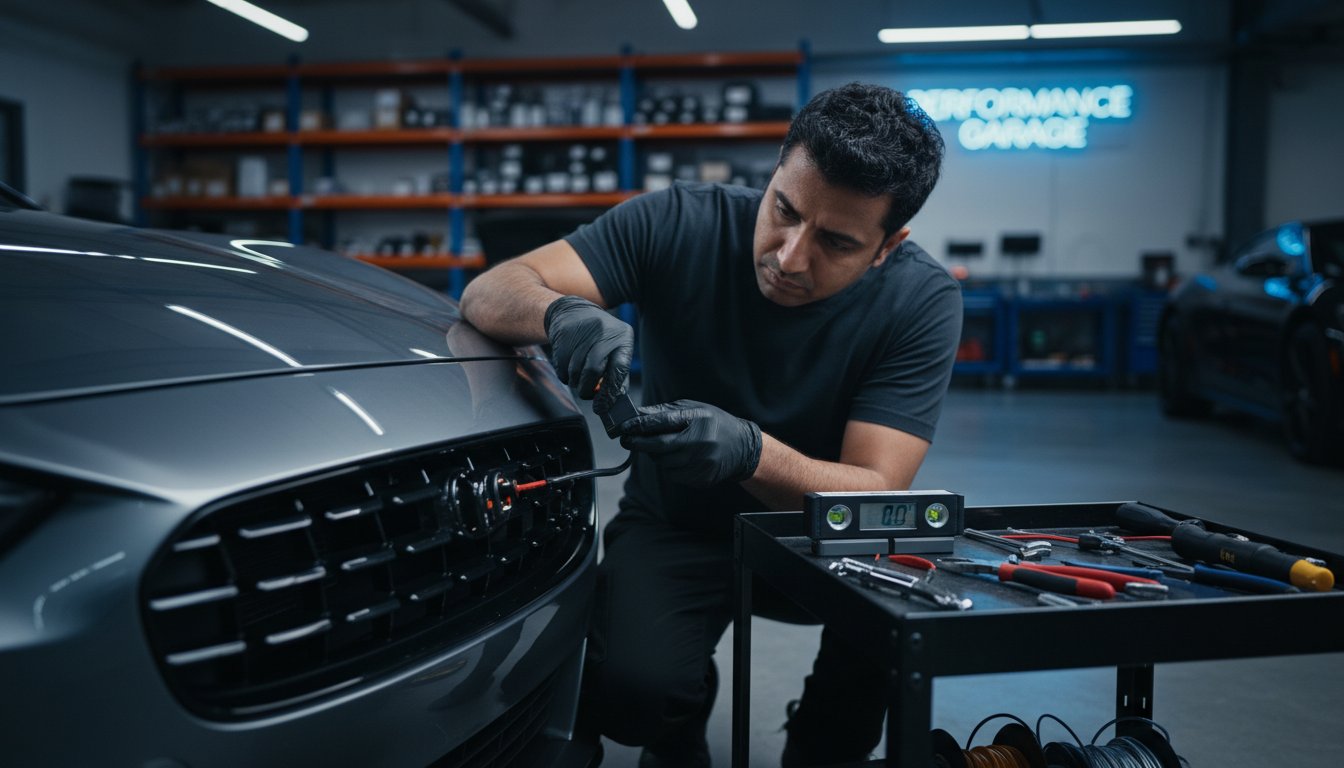
You’ve invested in the legendary performance of the AL Priority system-the #1 best performing laser defense on the market. But the ultimate protection it promises is only as powerful as its installation. The fear of incorrect sensor placement, the technical challenge of routing wires through a firewall, or the sheer risk of compromising a high-value vehicle can be daunting. A single misstep can neutralize your defense, leaving you vulnerable to the most advanced LIDAR threats when it matters most.
This is where your advantage begins. Consider this the ultimate laser jammer installation guide, engineered for the driver who refuses to compromise on performance. We will provide a step-by-step walkthrough that demystifies the entire process, empowering you with the technical knowledge to achieve a clean, stealthy, and flawless installation. You will gain the confidence that your system is positioned and configured for absolute maximum protection, knowing precisely when a DIY approach is viable and when to call in a professional for a factory-perfect finish.
Key Takeaways
- Sensor placement is the single most critical factor for achieving ultimate performance against police LIDAR. Learn the non-negotiable rules for perfect alignment and leveling.
- A flawless installation begins before you touch the vehicle. Discover the essential planning steps that prevent common mistakes and guarantee a professional-grade result.
- Master the most challenging part of the interior install. We provide the expert technique for safely routing sensor wires through your vehicle’s firewall.
- This comprehensive laser jammer installation guide doesn’t stop at hardware; it details the final configuration and firmware updates required to unlock legendary AL Priority protection.
Phase 1: Pre-Installation Planning & Preparation
In the world of high-performance countermeasures, execution is everything. A flawless laser jammer installation is not a matter of luck; it is the direct result of meticulous planning. For the person that refuses to compromise, this pre-installation phase is 90% of the battle, ensuring your AL Priority system delivers the legendary performance it was engineered for. This is the first and most critical step in our comprehensive laser jammer installation guide, whether you’re performing a DIY install or briefing a professional.
To visualize the precision required for sensor head placement, this overview is an essential starting point:
Essential Tools & Supplies Checklist
Assembling your toolkit before you begin prevents delays and ensures a professional-grade result. Having the right equipment on hand is the mark of a serious installer who values precision and efficiency.
- Required Tools: Automotive trim removal kit, multimeter or circuit tester, drill with various bits, wire strippers and crimpers, socket set, and a fish tape or wire puller.
- Recommended Supplies: High-quality zip ties, Posi-Taps or T-taps, 3M electrical tape, split wire loom for a clean and protected finish, and adhesive promoter.
- Safety Gear: Always wear safety glasses and gloves to protect against debris and sharp edges.
Mapping Your System Layout
Strategic placement is paramount. Before a single wire is run, you must map the entire system. Consider the CPU’s location for both stealth and accessibility-especially for the USB port needed for firmware updates against emerging threats. A deep understanding of how police LIDAR technology works informs why sensor placement and wiring paths are so critical. Plan a clean route for wiring from the engine bay, through the firewall, and into the cabin to connect the Control Pad and speaker for a seamless factory look.
The Crucial ‘Bubble Test’ for Sensor Placement
Police LIDAR guns target flat, reflective surfaces. Your sensors must be perfectly level to the ground and parallel to the road to effectively return a jamming signal. This is non-negotiable. The ‘Bubble Test’ is a simple yet vital procedure using a small spirit or bubble level. Place the level on potential mounting locations on your vehicle’s grille or bumper. Only surfaces where the bubble is perfectly centered are viable candidates for mounting your AL Priority sensors. This step guarantees the optimal alignment necessary to defeat even the most advanced LIDAR threats.
Phase 2: Mounting the Laser Sensors (Heads)
This is the most critical phase of the entire process. The performance of your multi-purpose laser system is not determined by the hardware alone, but by the absolute precision of its installation. Sensor placement is the single most important factor for achieving ultimate protection against police LIDAR threats. An improperly mounted sensor is a liability, leading to diminished performance and false alerts. Following this professional laser jammer installation guide ensures your system operates at its peak capability, providing the legendary performance you expect. Meticulous installation also ensures your system functions correctly as a parking sensor, a critical distinction given the strict Federal law on jamming devices.
Optimal Front Sensor Placement and Mounting
For the person who refuses to compromise, front sensor placement must be perfect. The goal is to cover the most reflective areas of your vehicle-headlights and license plate-from the perspective of a police laser gun. A stealthy, integrated look is achieved by mounting sensors within grilles or air dams.
- Ideal Height: Mount sensors between 18-24 inches from the ground for optimal line-of-sight to LIDAR equipment.
- Secure Mounting: Use the included high-grade brackets or fabricate custom mounts to ensure the sensors are rock-solid. Any vibration while driving will severely degrade performance.
- Unobstructed View: The sensor face must have a completely clear, unobstructed view of the road ahead. Do not place it behind mesh grilles or other vehicle components.
Rear Sensor Installation Strategy
Rear protection is a non-negotiable component of a complete defense strategy. The area around the rear license plate frame is the most effective mounting location, as it is the primary target for rear-facing laser. Route the sensor cable with extreme care, either through the vehicle’s interior trim or securely along the undercarriage using high-quality fasteners and conduit to protect it from road debris and the elements. Always use weatherproof connectors for any connections exposed to the outside environment to guarantee long-term reliability.
Leveling and Aiming: The Key to Performance
Your system’s ability to detect and counter a threat hinges on perfect aim. This step demands precision. The sensors must be perfectly level with the road surface and aimed straight forward, parallel to the direction of travel. Even a slight angle up, down, or to the side can render the system ineffective. Use a bubble or spirit level placed directly on top of the sensor head to verify it is perfectly horizontal. After tightening all mounting hardware, double-check the level one last time to ensure nothing has shifted. Compromise here is not an option.

Phase 3: Interior Installation & Wiring
With your exterior sensors securely mounted, this phase brings the legendary performance of AL Priority to life inside your vehicle’s cabin. This is where the central nervous system of your countermeasure setup is established. A clean, professional wiring job is not merely for aesthetics; it is the foundation of system reliability and ensures flawless communication between components. Understanding the precision of the threat-and how police LiDAR guns work-reinforces why every connection must be perfect. For the owner who refuses to compromise, this part of our laser jammer installation guide is non-negotiable.
Getting Through the Vehicle’s Firewall
The primary challenge in this phase is routing the sensor cables from the engine bay into the cabin without compromising the vehicle’s integrity. The only professional method is to use an existing factory grommet.
- Locate the Grommet: Check the firewall on the driver’s or passenger’s side for a large, rubber grommet where the factory wiring harness passes through.
- Puncture and Pass: Carefully create a small, clean puncture in the rubber-do not slice it. Gently feed the sensor cable connectors through the opening.
- Protect and Seal: Once the cables are inside, seal the puncture point with automotive-grade silicone to create a permanent, watertight seal. In the engine bay, encase the cables in a protective wire loom to shield them from heat and abrasion.
Connecting the Core Components
With the wiring inside, you can now connect the core components that form the heart of your AL Priority system. Mount the central CPU in a hidden yet accessible location, such as under the dashboard or behind the glove compartment, ensuring it is secure and won’t rattle. Connect the sensor cables, the Control Pad, and the HiFi speaker to their designated ports on the CPU. Strategically place the Control Pad for easy access and the speaker in a location where its crystal-clear audio alerts can be heard without obstruction.
Powering Your AL Priority System
Ultimate performance demands a flawless power source. A weak or improper power connection is the leading cause of system issues. For a clean, reliable, and reversible installation, an ‘add-a-fuse’ tap is the superior choice. Select a switched 12V fuse in your vehicle’s fuse box-one that provides power only when the ignition is on. This prevents any possibility of battery drain. Finally, secure the ground wire to a clean, unpainted chassis bolt for a solid connection. This stable power delivery is the final, critical step to unlocking your system’s defensive power.
Phase 4: System Configuration and Final Testing
A physically perfect installation means nothing without intelligent configuration. This critical phase transforms your AL Priority hardware from a passive component into a dominant, active defense shield. Following these steps in our laser jammer installation guide ensures you unleash the system’s legendary performance and are prepared for any threat on the road. Your installation is not complete until every setting is optimized and every component is verified.
Updating Firmware and Loading Settings
To dominate the most advanced police LIDAR guns, your system must run the latest software. AL Priority engineers constantly release firmware updates to defeat emerging threats. Download the most current files directly from the official AL Priority website onto a USB drive. Insert the drive into the system’s CPU to initiate the update, arming your vehicle with the most advanced countermeasure technology available. Once updated, use the ALPconnect mobile app or web interface to access and fine-tune your system settings.
Recommended Configuration Settings
Customize your AL Priority to match your driving style and local regulations for ultimate control. While every driver’s preference is unique, these settings provide a powerful and versatile baseline for most users:
- Defense Mode: Set to ‘Constant Jam’ for continuous defense during a LIDAR encounter. For a more discreet approach that deactivates after a few seconds, select a timed option like ‘Pulse-Only’ or a specific number of seconds.
- Parking Sensor Mode: Enable this feature for daily driving. It ensures your system operates as a 100% legal parking aid until a police laser threat is detected, at which point it instantly switches to defense mode.
- Audio and Visual Alerts: Adjust the HiFi voice alert volume and control box LED brightness to your exact preference, ensuring alerts are clear and unambiguous without being intrusive.
Final Operational Testing
Verification is the final, non-negotiable step. First, confirm the system powers on and off with the vehicle’s ignition, indicating a correct power connection. If you installed the optional GPS module, verify that the system acquires a satellite lock, which enables speed-based features. Finally, the only way to guarantee sensor functionality is to perform a live-fire test. Using an official police LIDAR tester, verify that each sensor detects the signal and that the system initiates its defense protocol as configured. This is the ultimate proof of a successful installation.
Your vehicle deserves the best protection, built from the best components. Don’t compromise on quality. Shop AL Priority Parts & Accessories to ensure a perfect, performance-driven install.
Troubleshooting Common Installation Issues
Even with the legendary precision of an AL Priority system, a perfect installation is paramount for achieving ultimate performance. When issues arise, they are almost always due to simple wiring or configuration oversights, not a fault in the hardware. This section of our definitive laser jammer installation guide is designed for the person who refuses to compromise, providing a rapid-diagnostic checklist to ensure your system operates flawlessly. Following these steps will resolve common problems quickly, saving you from unnecessary frustration and getting you back on the road with total confidence.
System Fails to Power On
A lack of power is the most fundamental issue, but it’s typically the easiest to solve. Before suspecting a component failure, perform a systematic check of your power circuit. Precision is key to identifying the source of the problem.
- Check the Fuse: Immediately inspect the fuse in your add-a-fuse tap or inline fuse holder. Ensure it has continuity and is the correct amperage specified for the system.
- Verify 12V Switched Source: Use a multimeter to confirm your chosen power source provides a solid 12V+ only when the vehicle’s ignition is on. A constant-on or weak source will cause operational issues.
- Confirm Ground Connection: The ground wire must be secured to a clean, unpainted bare metal point on the vehicle’s chassis. A poor ground is a leading cause of intermittent or total power failure.
Constant Falsing or Sensor Error Alerts
Your AL Priority system is engineered for extreme accuracy against police LIDAR. Constant error alerts or false alarms indicate an issue with sensor data transmission or placement. Isolate the problem with these critical checks.
- Secure Cable Connections: Ensure each sensor cable is fully and securely seated into its corresponding port on the CPU. A partially connected plug can interrupt data flow and trigger an error.
- Ensure a Clear View: Verify that every sensor has a completely unobstructed, forward-facing line-of-sight. Even a small part of the grille, trim, or a license plate frame can interfere with its view and cause errors.
- Check for Reflective Surfaces: Confirm sensors are not aimed at highly reflective surfaces on your own vehicle, such as a chrome grille surround or aftermarket lighting, which can cause signal bounce-back and trigger false alerts.
Firmware Update Fails
Keeping your system armed with the latest threat definitions is critical for uncompromised protection. A failed update is almost always a simple file or formatting error on your USB drive, not an issue with the CPU.
- Confirm FAT32 Format: The USB drive must be formatted to FAT32. Other formats like exFAT or NTFS are not compatible and will result in a failed update.
- Verify File Placement: The necessary update files must be extracted and placed in the root directory of the USB drive, not inside any folders.
- Try a Different USB Drive: Occasionally, a specific USB drive may have compatibility issues. Using a different, high-quality flash drive often resolves persistent update failures.
By methodically working through these diagnostics, you can ensure your system is perfectly calibrated. For advanced support and access to the latest firmware, we recommend consulting the official resources at alpriorityusa.com.
From Installation to Invincibility: Your Final Checkpoint
You now possess the technical knowledge to execute a perfect installation. This comprehensive laser jammer installation guide has demonstrated that meticulous pre-planning and precise sensor mounting are the foundation of effective protection. A clean, professional wiring job and rigorous final testing are the final steps that transform your vehicle into a fortress against LIDAR threats.
A flawless installation demands the ultimate hardware. The AL Priority system is engineered for the driver who refuses to compromise, delivering the #1 Rated Performance in Independent Tests and functioning as the world’s first multi-purpose laser parking system. Its legendary performance is matched only by its ability to achieve a complete stealth installation for a true factory look. Refuse to compromise. Equip your vehicle with the #1 AL Priority System. Drive with the absolute confidence that comes only from knowing you are equipped with the best.
Frequently Asked Questions
Can I install a laser jammer myself or do I need a professional?
While many enthusiasts with automotive electrical experience can perform the installation, we recommend a professional for guaranteed optimal performance. The AL Priority system is the world’s leading laser defense, and its legendary effectiveness depends on perfect sensor alignment and secure wiring. For the person who refuses to compromise on protection against advanced LIDAR threats, a professional installation ensures your system operates at its #1 best-performing capability from day one.
How long does a typical AL Priority installation take?
A standard AL Priority installation performed by a seasoned professional typically takes between 3 to 5 hours. This timeframe allows for the meticulous sensor placement and leveling, routing of wires discreetly through the firewall, and seamless integration of the control unit into your vehicle’s interior. Complex installations on exotic vehicles or those requiring custom fabrication may require additional time to achieve the uncompromising standard of quality and performance that defines our system.
What is the most common mistake people make during installation?
The most critical and common error is improper sensor alignment. AL Priority sensors must be perfectly level with the road and aimed straight ahead to provide maximum protection. Even a few degrees of tilt can significantly degrade performance against police LIDAR, leaving you vulnerable. Using a bubble level during this stage is non-negotiable. This is the single most important step in any laser jammer installation guide and the primary reason professional expertise is advised.
Will I have to drill holes in my car’s bumper?
In many cases, no. Our sensors are compact and can often be mounted discreetly within the grille or other existing openings. However, for some vehicles, achieving the optimal, unobstructed placement required for ultimate protection may necessitate drilling small, clean holes. Professional installers are experts at this, using specialized tools and techniques to create a factory-finish appearance that is both effective and aesthetically pleasing, preserving your vehicle’s integrity.
How can I find a reputable professional installer in my area?
As the leading multi-purpose laser parking system on the market, AL Priority maintains an exclusive global network of authorized and vetted installation specialists. These are not just mechanics; they are elite technicians who understand the precision our systems demand. The most direct path to finding a certified expert is to consult the official dealer locator on our website. We only partner with installers who meet our uncompromising standards for excellence and performance.
Is it better to wire the system to a constant or a switched power source?
For ultimate reliability and performance, the AL Priority system must be wired to a switched 12V power source. This ensures the system powers on and off with your vehicle’s ignition, preventing any possibility of draining your battery when the car is parked. A switched source, such as an “add-a-fuse” circuit in the fuse box, provides the clean and dependable power supply that guarantees your system is armed and ready the moment you start your engine.
Leave a Reply